v0.4.0 July 2026 roar GLaaS
roar tag
Compliance tags that don't fall off
Some facts about your data only a human knows — it's under this license,
it contains PII, it's EU-jurisdiction. Until now those facts lived in a
wiki and fell off the moment anyone derived a new artifact. roar tag
makes them hereditary: tag the training data once, and every
downstream checkpoint, eval result, and derived dataset inherits the tag
during the traced run — marked as inherited, so an auditor can tell it
from a fresh human assertion. roar tag why walks the chain
back to the human act that set it. And when a step genuinely strips PII,
roar run --block-tag contains_pii declares the barrier where
it happens — outputs are born clean, and the barrier itself is a recorded,
auditable fact.
Docs →
$ roar tag add contains_pii=present @data/train.parquet
$ roar run python train.py
$ roar tag show model.pt
contains_pii=present (inherited · via train.py @3)
glaas.ai
The AI-BOM: your model's bill of materials
Register a session and glaas.ai assembles an AI Bill of Materials from
the lineage — datasets, models, code commits, environments, and how they
connect — downloadable as CycloneDX 1.7 in one click. It's scored for
completeness against the G7 SBOM-for-AI, CISA, and NTIA minimum elements,
with a checklist of what's missing, and a guide mapping it onto EU AI Act
Annex IV. Tags and licenses you attach at trace time flow straight into
the manifest: the lineage you were already capturing becomes the paperwork.
How it works →
v0.3.7 July 2026 roar GLaaS
roar show --remote
Inspect published lineage from anywhere
Someone pastes a hash in Slack or a PR. You can now roar show
<hash> --remote and see it — the producing job, inputs,
labels, owner and visibility — from any directory, with no local project,
no clone, and no login for public artifacts. roar label --remote
edits metadata on GLaaS the same way, by session hash, job UID, or
artifact hash, with writes applied immediately.
$ roar show 2a38451304ce1fc6 --remote
artifact model.pt · public · produced by train.py @3
tracer publish
The safetensors gap, closed — and stricter secret hygiene
The classic capture gap: a framework writes a checkpoint to a temp file
and atomically renames it into place. The preload tracer now recovers
outputs renamed via untraced inline syscalls — including cross-directory
and whole-directory renames — so the checkpoint lands in your lineage
under its real name. On the publish side, secrets in label metadata are
redacted before anything leaves your machine, and git URL credentials
are scrubbed in all their forms, including scp-style remotes.
roar label sync
Label sync that fails closed
Local label unsets now propagate to GLaaS as deletions — but only after
explicit confirmation, and sync fails closed if GLaaS doesn't confirm.
Registration packages also carry your current labels, so first-party
lineage arrives annotated. Plus small ergonomics: roar session
hash, and register defaults to the active session.
roar register roar reproduce
Know before you publish whether it reproduces
The whole point of registering lineage is that someone else — or future
you — can rebuild the artifact. 0.3.6 makes that testable up front: a
shared reproducibility checklist appears at both register
and reproduce time. Commit pushed? Inputs sourced? Artifact
paths in tracked directories? Single commit? You find out before you
share, not after. register also warns when lineage depends
on unsourced inputs — data with no recorded origin — and names the
offender. Running outside a git repo still works, with honest wording
about what that costs you.
Docs →
$ roar register model.pt
Reproducibility: 6/7
✓ commit pushed ✓ inputs sourced ✗ outputs dir untracked
roar reproduce
Reproduce got a lot stricter
reproduce now checks out the producing commit, scopes the
replay to the producing sub-DAG rather than the whole session, pins the
venv to the recorded Python interpreter, and replays into its own fresh
session. It resolves code from the best available source — a remote isn't
required — fails clearly on incomplete runs, and flags lineages that span
multiple commits. Publishing got more honest too: receipts show exactly
what you're publishing as whom, visible to whom, and non-shareable
file:// repos stay off GLaaS.
roar login
One auth namespace, one wheel per platform
Auth grew organically across SSH keys and browser logins; 0.3.5 unifies
it: roar login / roar logout aliases and a
merged auth status that includes a connectivity test, so
"am I logged in and can I reach GLaaS" is one command. Packaging got
simpler too — a single abi3 wheel per platform covers every supported
Python.
roar get
Faster downloads, cleaner captures
roar get downloads multi-file datasets in parallel. Capture
fidelity picked up a round of fixes: roar's own injected environment
variables no longer appear in captured env reads, CPU models resolve
correctly on aarch64, and the hardware cache is versioned so fixes reach
existing projects. And a command that doesn't exist now fails with a
clean error instead of a puzzle.
v0.3.4 June 2026 roar GLaaS
composite artifacts
Datasets get one real identity
A Hugging Face dataset is hundreds of parquet shards; a sharded
checkpoint is dozens of files. Treating each file as its own artifact
made lineage technically true and practically useless. 0.3.4 gives
multi-file datasets a single content-derived identity — with structural
detection for Hugging Face, LeRobot, RLDS, and zarr-style layouts, and
nested composites for datasets inside datasets. Robotics teams: your
episode datasets are now one node in the DAG, not ten thousand.
Docs →
views
Train on a slice, and the DAG tells the truth
Download a subset with roar get --limit and the record shows
a view of the full dataset's anchor — subset provenance, not a
fake new dataset. A blake3 + sha256 crosswalk means data fetched from
Hugging Face and the "same" bytes later roar put to object
storage resolve to the same identity, and the DAG draws
producer→consumer edges even when only the composite is shared.
publish tracer
Quieter lineage, safer publishing
Credential files (.netrc) are always filtered from lineage,
and well-known library caches (looking at you, ~/.triton/cache)
are excluded via ignore_library_caches. Re-running
register is now idempotent, with a summary that separates
newly-registered from already-present jobs. The tracers learned to follow
splice zero-copy reads, git provenance records the real
remote even when it isn't named origin, and everything you
publish carries a roar.version label. Plus roar db
for local database status, and progress spinners where get/put used to
go silent.
v0.3.3 May 2026 roar GLaaS
roar show
Jump from an artifact to its W&B / MLflow / Neptune run
When a checkpoint looks wrong, the next thing you want is the dashboard that
logged it. roar already watches the directories Weights & Biases, MLflow,
and Neptune write to during a run — so roar show now surfaces a
direct link to the experiment run that produced an artifact. No more hunting
through tabs to find the run behind a file.
Docs →
$ roar show @3
Experiment:
wandb: https://wandb.ai/acme/foundation-models/runs/3xk9p2aq
roar filter
Share project-level lineage filters with your team
This one came straight from the field. We kept seeing Weights & Biases fill
lineage with reads and writes that had nothing to do with how a model was built
— pure noise. Hardcoding a wandb-specific filter felt wrong, though: the next
tool would just bring its own noise. So we made filtering configurable instead.
And since "what counts as noise" is a property of the project, not your
laptop, those rules belong with the repo — not in the local, gitignored
.roar/ config. Hence roar filter: it writes ignore
patterns to a committed .roarconfig, so the whole team's lineage
skips the same paths — one version-controlled file, instead of each teammate
re-discovering it locally.
$ roar filter add wandb/ .cache/wandb/
+ wandb/
+ .cache/wandb/
Updated ./.roarconfig
roar get roar put
Name your get/put steps, and a faster roar run
roar get and roar put now take -n/--name,
so download and publish steps read in plain language across show,
dag, and diff — matching roar run and
roar build. And post-run overhead dropped by roughly 190ms, so
wrapping quick commands in roar run feels lighter.
roar run
Trace code that runs under a different Python than roar
With 0.3.0 we moved the recommended install to
uv tool install roar-cli, which pins roar under its own Python.
If your project ran under a different Python version, the injected
backend could fail with a confusing ImportError deep inside its
dependencies. If you hit errors on 0.3.0, this is the fix.
0.3.2 detects the version mismatch and provisions a matching runtime on the
fly — and your file I/O is captured either way.
Docs →
# 0.3.0: roar tool on 3.13, project on 3.12 → confusing ImportError
# 0.3.2: detected and handled automatically
$ roar run python train.py
# or pin roar to your project's Python:
$ uv tool install --python python3.12 roar-cli --reinstall
roar run
Clean-tree errors that tell you whether to commit or ignore
roar run requires a clean git tree — every run is tagged with the
commit SHA, so the commit alone explains what was on disk. When it refuses, it
now explains why and offers the right fix: gitignore the outputs of past runs,
or commit the source you changed. The rule didn't change; the guidance got a
lot more helpful.
Why clean commits →
roar dag hints
Faster read-only commands, and hints your agent can see
Read-only commands like roar dag and roar show got
roughly 300ms faster by not loading execution backends they never use. And
roar's next-step hints now print to stderr instead of suppressing themselves
when output isn't a terminal — so CI logs and coding agents finally see them.
Prefer them quiet? Turn hints off with
roar config set hints.enabled false.
packaging
Packaging republish
A packaging-only republish of 0.3.0. No functional changes.
v0.3.0 May 2026 roar GLaaS TReqs
roar diff
See what changed between two models
Two models perform differently — but what changed? The code, the dataset,
a hyperparameter, the environment? roar diff compares two runs
or artifacts, walks both lineage graphs, and pinpoints the difference —
ranked so the likely root cause comes first. No reconstructing runs from
logs; the only thing it ever cost you up front was the roar run
prefix. Docs →
# why do these two models differ?
$ roar diff f5142dca 28e48632
ROOT CAUSE: Step @2: --lr A: 0.01 B: 0.5
PARAMS
Step @2: --lr A: 0.01 B: 0.5 [0.58] *
UNCHANGED code · environment · inputs
roar tui
Watch your agent train, live in the terminal
Browse sessions, inspect jobs and artifacts, walk the DAG, relaunch tracked
commands, edit labels, and search lineage — all from the terminal. Leave it
open in a split pane and watch the pipeline your agent is executing: jobs and
artifacts appearing in the DAG as the agent runs them. (Yes, we shipped a TUI
in 2026. We know. We're nostalgic.)
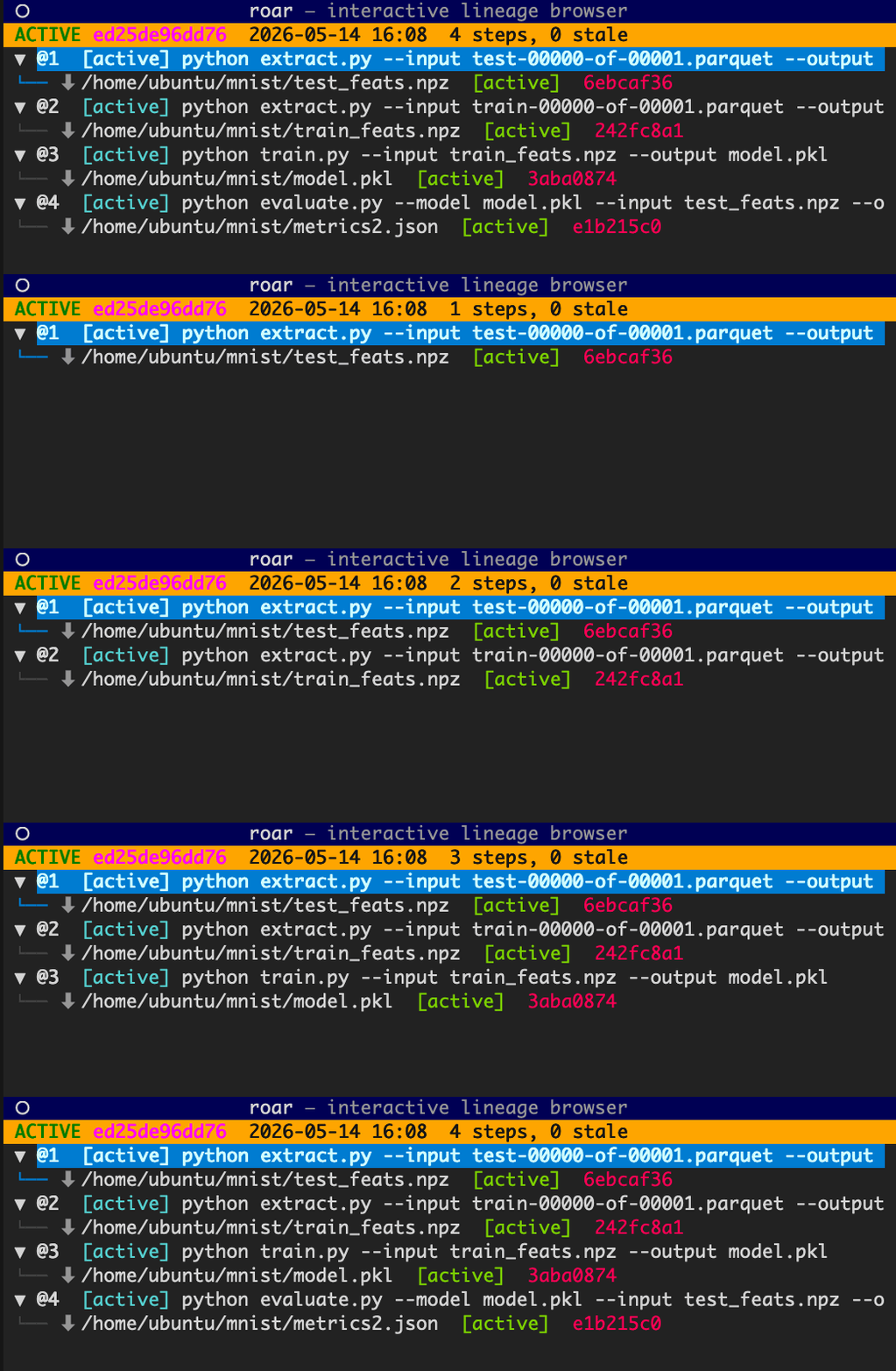
# browse lineage; follow your agent's pipeline live
$ roar tui
roar init agents
Let your agents keep their own lineage hygiene
Agents are increasingly writing and running code on expensive compute.
roar init agents installs a Claude skill and an
AGENTS.md section in your project — so coding agents know to
wrap their commands in roar run on their own, without you
reminding them every session.
$ roar init agents
created ~/.claude/skills/roar/SKILL.md
created ./AGENTS.md
roar login roar scope
A familiar login flow, and control over what you share
roar login authenticates with a standard browser flow and
remembers you across every repo on the machine. roar scope sets,
per repo, whether lineage publishes privately, to an org project, or publicly
— so attribution and privacy are a setting, not a flag you retype on every
register. Docs →
$ roar login
$ roar scope use private
$ roar scope status
active: private · auth: logged in
roar telemetry
Anonymous telemetry, off with one command
roar keeps anonymous, local-first product counters — version and command
names, never file contents, paths, arguments, or tokens — to help us
prioritize reliability work. It is opt-out: roar telemetry --disable,
DO_NOT_TRACK=1, or roar config set telemetry.enabled false,
and environment opt-outs always win. See exactly what would be sent with
roar telemetry --print before anything leaves your machine. Read the
telemetry docs
and our privacy policy.
# see the exact next payload, then opt out if you like
$ roar telemetry --print
$ roar telemetry --disable
tracer build
Linux aarch64 wheels and a major tracer reliability pass
Prebuilt Linux aarch64 wheels mean pip install roar-cli
just works on Graviton, Ampere, and other ARM hosts — no compiler needed.
And a broad tracer reliability pass closed gaps where shell redirects,
pipelines, and short-lived writes could slip past capture, so the lineage
roar records matches what your commands actually did.
Docs →
roar workflow generate GLaaS TReqs
Run in TReqs: turn a session into a training request
roar captures what happened; GLaaS stores the graph; TReqs adds review before
compute starts. roar workflow generate turns a session you have
already run into a workflow-backed training request — dataset, compute, budget,
rationale, reviewed before the money moves, and resolving back to a reproducible
record. Meet TReqs at
treqs.ai/treqs.
v0.2.11 April 2026 roar GLaaS
roar inputs
Trace any artifact back to its data
If your model behaves oddly, the first question is usually "what data actually went into it?"
roar inputs walks the lineage DAG backwards from any artifact or job
and returns the root data sources with their content hashes — the real inputs,
not what you think you used. Useful for catching test contamination,
satisfying a compliance request, or just confirming which dataset version was live.
# trace model → data (no guessing)
$ roar inputs model.pkl
train.parquet blake3:b8970b3597e2...
# catches contamination too
$ roar inputs metrics.json
train.parquet blake3:b8970b3597e2...
test.parquet blake3:cf86aa78570a...
roar label cp roar label history
Propagate labels and track their history
roar label cp copies labels from a job to the artifacts it produced in
one command — so you don't have to re-tag each artifact individually.
roar label history shows every version of a label on any entity, with
a diff of what changed between versions.
Labels set on jobs or sessions propagate through the DAG to the artifacts they produce.
On GLaaS, labeled lineage is now queryable as leaderboards and filtered views — sort
runs by any numeric label, filter by any categorical one.
# copy labels from job to artifact
$ roar label cp job @2 artifact ./model.pt
job @2 → artifact ./model.pt phase=train lr=0.001
# see label history on an artifact
$ roar label history artifact ./model.pt
[v1] model.name=resnet50
[v2] phase=train lr=0.001
GLaaS
Custom leaderboards and filtered views
Your Lineage on GLaaS now supports custom leaderboards and dataset lists sorted by label values.
Sort runs by any numeric label — accuracy, loss, F1, whatever you track —
and filter by any categorical label to compare only what's relevant.
No extra tooling; it's all derived from the labels already in your lineage.
v0.2.10 March 2026 roar GLaaS
roar label
Attach queryable metadata before it publishes
Set key-value labels on any session, job, or artifact locally. Labels are stored in the
local lineage DB and synced to GLaaS at register time — so you can tag a training run
with its hyperparameters, mark which dataset version an artifact came from, or track
experiment stages without touching your training script.
# tag a run with experiment params
$ roar label set job @latest phase=train lr=0.001 dataset=v3
job @latest phase=train lr=0.001 dataset=v3
# labels sync to GLaaS when you register
$ roar register
published job @latest with labels → glaas.ai/runs/...
roar run ray job submit
Ray worker lineage streams back and reconstitutes locally
When a distributed Ray job finishes, encrypted lineage fragments from each worker
stream back and are reassembled into a complete local record — the same structure
as a local run. Cross-task artifact edges are resolved automatically from the fragment
timestamps and dependency graph. The local lineage DB is rebuilt from the fragment
store even if the driver disconnects mid-job.
roar register GLaaS
Publish sessions, steps, and artifacts independently
roar register now covers all entity types, not just jobs. Useful for
manually registering an artifact produced outside a tracked run, publishing a step
in isolation, or registering session metadata without a full run context.
roar run ray job submit
Distributed Ray jobs captured end-to-end
Prefix any ray job submit command with roar run and roar
intercepts the submission — injecting itself into the Ray runtime_env,
attaching a per-task worker tracer to each actor, and collecting lineage from across
the cluster. No changes to your Ray job code. The driver and all workers record
against the same session.
# before: lineage lost across Ray workers
$ ray job submit -- python train.py
# after: roar intercepts and instruments the cluster
$ roar run ray job submit -- python train.py
[roar] intercepted ray job submit
[roar] injected roar-cli==0.2.8 into runtime_env
training... 3 workers · 8 tasks
run @36 [recorded]
startup
CLI startup time cut roughly in half
sitecustomize now uses lazy imports, a disk-cached package map, and a
fast TOML reader for the quiet-mode check. Cold startup on most systems drops from
~1.2s to ~0.5s — meaningful when roar wraps a script that runs in seconds, or when
you're iterating quickly.
# v0.2.7
$ time roar --help real 1.24s
# v0.2.8
$ time roar --help real 0.51s
proxy
S3 multipart uploads and cross-region buckets tracked correctly
Two S3 proxy fixes: multipart upload ETags and object sizes are now recorded in
the run result (previously missed on large uploads), and cross-region bucket
redirects are handled transparently instead of failing silently.
v0.2.7 February 2026 roar
ray
Per-task lineage from distributed Ray workers
A RoarNodeAgent actor runs on each cluster node, capturing file I/O,
S3 reads and writes, and artifact hashes per task. Lineage is attributed to individual
Ray tasks and reassembled into a DAG with correct cross-task edges and step topology.
The per-task tracer is injected via runtime_env — no changes to your
Ray job.
build
Broader Linux compatibility via glibc 2.17
Linux builds now target glibc 2.17 using cargo-zigbuild, replacing the
previous musl static build. musl was incompatible with aws-lc-sys and other C
extension dependencies; glibc 2.17 covers virtually all Linux distributions still
in use without sacrificing portability.
filters
roar's own internals no longer appear in lineage
File reads and writes inside .roar/, .git/, editable install
paths, and worker bundle directories are now excluded from captured lineage. Previously,
roar's own bookkeeping could show up as recorded activity in a run.